
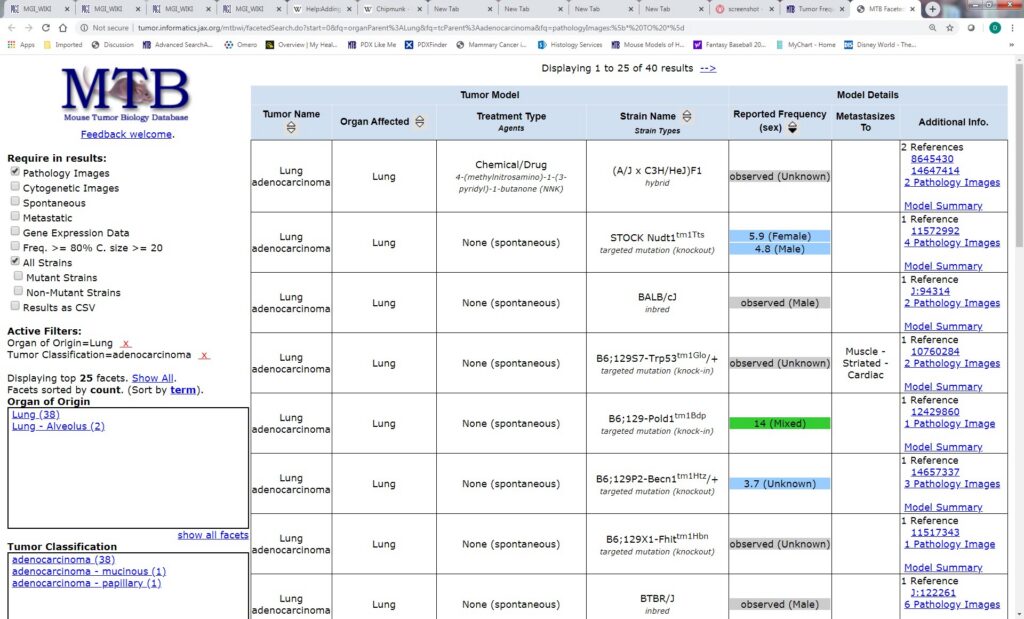
Faceted navigation is one of the most useful features on a large ecommerce site—and one of the easiest ways to create an uncontrolled crawl problem.
Filters for brand, color, size, price, material, availability, rating, and other attributes can help shoppers find the right products quickly. But when every filter combination creates a crawlable URL, a store can expose thousands or even millions of URL variations that provide little or no unique search value.
The SEO goal is not to remove useful filtering. It is to decide which filtered states should be discoverable and potentially indexable, which should remain purely navigational, and how the site should prevent unnecessary URL combinations from consuming crawl resources.
What is faceted navigation?
Faceted navigation is a filtering system that lets visitors narrow a collection by attributes such as brand, color, size, price, category, material, rating, or availability.
For example, an ecommerce category might start at:
/shoes/
A visitor could then select a brand and color:
/shoes/?brand=nike&color=black
Add another filter and the URL can become:
/shoes/?brand=nike&color=black&size=10&price=100-150
From a user’s perspective, these combinations can be useful. From a crawler’s perspective, every unique URL can look like another page that needs to be fetched and evaluated.
Why faceted navigation can become an SEO problem
Google explains that parameter-based faceted navigation can create very large URL spaces. When crawlers spend resources fetching low-value filtered URLs, discovery of more useful pages can become less efficient. Google specifically identifies overcrawling and slower discovery as major risks of uncontrolled faceted navigation. Google’s faceted navigation documentation provides the current technical guidance.
The problem becomes more serious when a store has:
- Many filter attributes.
- Many possible values for each attribute.
- Filters that can be combined in arbitrary orders.
- Multiple URL formats for the same filtered state.
- Sort, pagination, tracking, and filter parameters mixed together.
- Internal links pointing to large numbers of low-value combinations.
The result can be a huge number of crawlable URLs without a corresponding increase in useful search content.
Not every filtered URL should be an SEO landing page
A common ecommerce mistake is treating every filter combination as an SEO opportunity.
Suppose a store sells 5,000 products and offers filters for brand, color, size, material, price range, and rating. The number of possible combinations can grow rapidly. Most combinations will not represent meaningful search intent.
A better approach is to classify filtered states by purpose:
| URL type | Typical purpose | SEO treatment |
|---|---|---|
| Main category | Core commercial intent | Usually indexable |
| Useful subcategory | Distinct product intent | Potentially indexable |
| High-value curated filter | Strong, specific search demand | Potentially indexable after validation |
| Temporary filter combination | On-site shopping convenience | Usually keep out of search |
| Sort variation | Changes ordering, not core content | Usually avoid indexing |
| Tracking variation | Analytics or campaign measurement | Keep out of search |
| Empty filter combination | No matching products | Return an appropriate 404 |
The important distinction is between useful search landing pages and temporary navigation states.
Start with search intent, not URL generation
Before allowing a filtered page to become an SEO target, ask whether a real searcher would benefit from landing on that exact collection.
For example, a retailer might legitimately create a page around a strong product concept such as “black waterproof trail running shoes.” If that combination represents a meaningful product collection and can be supported with useful content and inventory, it may deserve a dedicated landing page.
By contrast, a combination such as “black, size 10, under $137, four-star rating, sorted by newest” is primarily a shopping state. There is usually little reason to make that exact combination a permanent search destination.
This is where faceted navigation connects with ecommerce keyword mapping: decide which product concepts deserve dedicated search targets before opening the entire filter system to crawlers.
Control URL combinations deliberately
Google’s current guidance recommends choosing an intentional strategy for faceted URLs. If filtered URLs do not need to appear in search, preventing crawling can be appropriate. If filtered URLs do need to be potentially crawled and indexed, the URL system should be designed consistently and carefully. Google’s documentation covers both approaches.
1. Prevent crawling of unnecessary facets
If a filtered URL has no search value, one option is to prevent crawling of those URL patterns with robots.txt. This can reduce the number of URLs that Googlebot needs to request.
This is especially relevant when filters generate huge numbers of combinations that are useful to shoppers but have no standalone search purpose.
Do not treat robots.txt as a universal indexing control, however. It is primarily a crawling directive. If a URL is already known to a search engine through links or other signals, blocking crawling does not necessarily mean the URL can never be referenced in search.
2. Use fragments when the filtered state does not need crawlable URLs
Google’s faceted-navigation guidance also describes URL fragments as an option when filters do not need to be crawled. Search engines generally do not use fragments as separate crawlable URLs in the same way they use URL parameters.
This can be useful for purely interactive filtering, provided the implementation still delivers a good user experience and does not hide important product links from crawlers.
3. Use canonicalization carefully
A canonical URL can help consolidate signals when multiple URLs represent substantially the same underlying page. Google notes that canonicalization can reduce crawling of non-canonical faceted variants over time, but it should not be treated as an instant crawl-control mechanism.
Canonicalization works best when the relationship between the variation and the preferred URL is clear. Do not automatically canonicalize every useful filtered page to the unfiltered category if the filtered page genuinely represents a distinct, valuable search destination.
4. Keep parameter formats consistent
URL consistency matters. The same filter state should not be reachable through many different parameter orders or representations if those URLs can all be crawled.
For example, these should not unnecessarily become separate crawl paths for the same state:
?brand=nike&color=black?color=black&brand=nike?brand=nike&color=black&sort=default
Where possible, define a predictable URL model and avoid exposing redundant parameter combinations.
Be careful with sorting parameters
Sorting normally changes the order of products rather than the underlying search intent. A page sorted by price, popularity, newest, or rating often does not deserve a separate search-indexable URL.
Google’s ecommerce documentation recommends avoiding indexing unnecessary URLs created by filters or alternative sort orders. Its pagination guidance also distinguishes genuine paginated collection pages from filter and sort variations.
Review URLs such as:
?sort=price-low?sort=popular?sort=newest?order=desc
and decide whether they should be crawlable at all.
Do not accidentally block important product discovery
Controlling facets should never make important product pages difficult for crawlers to discover.
Google recommends making important ecommerce pages reachable through normal crawlable links. Category pages should link to products, and important products should not depend entirely on users submitting a search form or triggering an interface action.
That means an ecommerce architecture should look more like:
Home → Category → Subcategory → Product
with filtering used as an additional shopping layer rather than the only route to product discovery.
See our ecommerce category page SEO guide for a broader look at category-page architecture and product discovery.
Empty filter combinations need a real response
One of the easiest technical mistakes is allowing every possible filter combination to return a soft page even when no products match.
For example:
/shoes/?brand=example&color=purple&size=99
If that combination has no products, the application should have a deliberate behavior. Google’s faceted-navigation guidance recommends returning a 404 for filter combinations with no results rather than redirecting users to an unrelated generic page.
This prevents large numbers of meaningless URLs from behaving like successful pages.
Watch internal links to faceted URLs
Crawl control is not only about robots.txt. Your own internal links determine which URLs crawlers can discover.
If every product listing contains dozens of filter links and those filters can be combined recursively, the site can expose a huge crawl graph.
Audit:
- Filter links in category pages.
- Filter links generated by JavaScript.
- Links to sorted collections.
- Links to parameter combinations.
- Links generated by widgets or recommendation components.
- Pagination combined with filters.
For high-value pages, use normal descriptive links and make sure the preferred URL is clear. For low-value filter states, avoid creating an unnecessarily large internal link graph.
Facets and pagination are different problems
Pagination creates a sequence of genuine collection pages. Filtering creates alternate views of a collection. They should not automatically receive the same SEO treatment.
Google recommends giving each paginated page its own unique URL and making the sequence crawlable through normal links. It also recommends avoiding the indexing of unnecessary filtered or alternative-sort URLs.
For example:
/shoes/— category/shoes?page=2— pagination/shoes?page=3— pagination/shoes?color=black— filter/shoes?sort=price-low— sort variation
Each represents a different technical situation. Treating them all as identical URL types can create indexing and crawl-control problems.
How to audit faceted navigation on an ecommerce site
Step 1: Collect parameter patterns
Export URLs from crawling tools, server logs, analytics data, XML sitemaps, and internal-link reports. Group URLs by parameter name.
Step 2: Identify the highest-volume parameters
Look for parameters responsible for the largest number of URLs. Brand, color, size, price, sorting, tracking, and session parameters are common examples.
Step 3: Separate search-worthy combinations
Use keyword research and business context to identify filter combinations that represent real search demand. Do not assume every popular filter deserves an indexable landing page.
Step 4: Review crawl behavior
Compare the number of valuable category and product URLs with the number of filtered variations being crawled. A large gap is a warning sign.
Step 5: Inspect indexation
Check whether unwanted parameter URLs are appearing in search indexes, being selected as canonical URLs, or receiving internal links.
Step 6: Test representative URLs
For each major parameter type, test valid, duplicate, sorted, paginated, and empty-result combinations. Verify status codes, canonical signals, robots directives, and crawlable links.
Step 7: Re-crawl after changes
Do not assume that a configuration change immediately eliminates old crawl patterns. Re-test representative URLs and monitor crawl behavior after deployment.
A practical faceted navigation decision framework
| Question | If yes | If no |
|---|---|---|
| Does this combination represent distinct search intent? | Consider a dedicated SEO landing page. | Keep it primarily navigational. |
| Does the page have useful, stable inventory? | Continue evaluation. | Avoid creating an indexable page. |
| Can the page have unique value beyond the filter label? | Build useful content and metadata. | Do not manufacture thin pages. |
| Is the URL stable and canonical? | Maintain one preferred format. | Normalize the URL system. |
| Does Google need to crawl it? | Allow crawling intentionally. | Consider crawl controls. |
| Does it produce zero results? | Not applicable. | Return an appropriate not-found response. |
Common faceted navigation SEO mistakes
Creating an indexable page for every filter
This is the most common scaling problem. A filter being useful to shoppers does not automatically make it useful as a search landing page.
Blocking everything without checking discovery
Overly broad crawling rules can interfere with the discovery of valuable content. Map the site’s URL architecture before applying global rules.
Relying only on canonical tags
Canonicalization is a signal, not a substitute for a coherent URL architecture. If millions of unnecessary URLs remain crawlable and internally linked, canonical tags alone may not solve the underlying problem.
Leaving empty combinations live
Zero-result filter URLs can multiply quickly. Make the application’s response to empty combinations deliberate and technically correct.
Ignoring internal links
A robots rule is not a replacement for a clean internal-link architecture. Reduce unnecessary URL generation at the source whenever possible.
Confusing user experience with indexation
A filter can be excellent for shoppers while still being unsuitable for search indexing. Good ecommerce SEO separates these two decisions.
How faceted navigation fits into a broader ecommerce SEO strategy
Faceted navigation should be managed as part of the whole ecommerce architecture rather than as an isolated technical SEO setting.
Your ecommerce SEO audit should connect crawlability, category architecture, product discovery, internal linking, structured data, page performance, and indexation. Your keyword map should then identify which commercial concepts deserve dedicated landing pages.
For product-level optimization, continue with our ecommerce product page SEO guide. For broader technical checks, use the technical SEO audit checklist.
Final takeaway
Faceted navigation is not inherently bad for SEO. The problem is uncontrolled URL generation.
A strong ecommerce implementation lets shoppers filter freely while giving search engines a controlled, intentional set of URLs. The best setup usually combines a clear category architecture, crawlable product links, deliberate filter handling, consistent URL patterns, appropriate canonicalization, sensible crawl controls, and a clear distinction between search landing pages and temporary shopping states.
The goal is simple: make useful ecommerce pages easy to discover and keep low-value URL combinations from consuming unnecessary crawl resources.
Official Google guidance
- Managing crawling of faceted navigation URLs
- Ecommerce URL structure best practices
- Ecommerce site structure and navigation
- Pagination and incremental page loading