
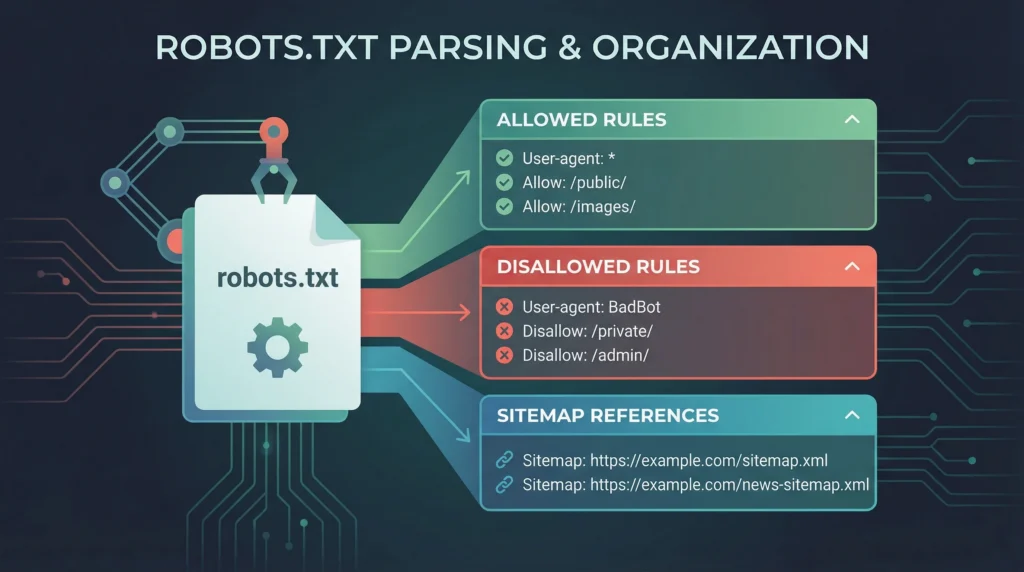
A robots.txt file and a robots meta tag can both affect how search engines handle URLs, but they solve different problems. robots.txt gives compliant crawlers rules about which paths they may fetch. A noindex directive asks a search engine not to include a crawlable page in its search results. Choosing the wrong control can leave a URL discoverable, prevent Google from seeing your intended directive, or block resources needed to render a page.
This guide explains when to use robots.txt, when to use noindex, what each cannot do, and how to test changes safely before they affect your site’s visibility.
Robots.txt vs. Noindex: The Core Difference
| Question | robots.txt | noindex |
|---|---|---|
| Primary purpose | Control crawler access to URL paths | Tell a supporting search engine not to index a page |
| Where it lives | Usually at the site root, such as /robots.txt |
In a page’s robots meta tag or an HTTP X-Robots-Tag response header |
| Does the crawler need to fetch the page to see it? | The crawler fetches robots.txt first to learn the rules | Yes. The crawler must be allowed to fetch the page or resource and read the directive |
| Does it guarantee removal from search results? | No. A blocked URL can still be shown if discovered through links or other signals | When Google can crawl the URL and processes noindex, it excludes that page from Google Search |
| Best fit | Reduce unwanted crawling of selected URL paths or resources | Keep a page out of search results while allowing it to be crawled |
Google explains that robots.txt is primarily a crawling control, not a reliable way to keep a page out of Search. See the official robots.txt introduction and noindex guidance.
When to Use robots.txt
Use robots.txt when you need to tell compliant crawlers not to request certain parts of a site. This can be useful for URL spaces that create many low-value variations, such as some faceted navigation combinations, internal search result URLs, or other crawl paths that should not consume unnecessary crawler requests.
For example, a simple robots.txt file might contain:
User-agent: *
Disallow: /internal-search/
Disallow: /filter-results/

Sitemap: https://www.example.com/sitemap.xml
This is only an illustrative example, not a configuration to copy blindly. The correct paths depend on your site architecture and which URLs you want crawlers to access. A broad rule such as Disallow: / can prevent crawling across the entire site, so changes must be reviewed carefully.
Robots.txt is not a security boundary
Robots.txt requests cooperation from crawlers; it does not restrict access for people, protect private data, or reliably stop malicious bots. Sensitive resources should be protected with authentication or appropriate access controls, not merely listed in a disallow rule.
When to Use noindex
Use noindex when a page is accessible to crawlers but should not appear in search results. Depending on the CMS and response type, it can be provided in an HTML robots meta tag or an HTTP response header.
Example HTML:
<meta name="robots" content="noindex">For supported non-HTML resources, a response may use:
X-Robots-Tag: noindexExamples of pages that may warrant noindex include certain internal search pages, low-value filtered views, or utility pages that are intentionally excluded from search. The decision should follow the page’s role, not a blanket rule applied to all URLs of a particular type.
The Critical Mistake: Blocking a Page That Needs noindex
If robots.txt disallows Googlebot from fetching a URL, Google may not be able to read the page’s noindex meta tag or X-Robots-Tag header. That means the desired indexing instruction may not be processed. A blocked URL can still appear in search results based on external links or other signals, sometimes without a descriptive snippet.
For a URL that must be removed from Google Search, the common workflow is to allow crawling long enough for Google to see and process the noindex directive, then verify the outcome. Do not block the URL in robots.txt at the same time unless there is a separate, carefully considered crawling reason and you understand the trade-off.
How to Choose the Right Control
| Scenario | Likely approach | Important check |
|---|---|---|
| A page should appear in search | Allow crawling; do not add noindex | Check status, canonical, internal links and content quality |
| A page should be crawled but not indexed | Use noindex and allow crawling | Confirm Google can fetch the URL and see the directive |
| A URL pattern creates large numbers of low-value crawl paths | Consider a targeted robots.txt rule | Ensure the rule does not block important pages or assets |
| A page contains confidential information | Use authentication or access controls | Do not rely on robots.txt or noindex for privacy |
| A page has moved permanently | Use an appropriate redirect, not robots.txt as a substitute | Check the destination, redirect chain and internal links |
| A page is a duplicate or alternate URL | Review canonicalization and whether the alternate should remain crawlable | Keep canonical signals consistent and inspect the preferred URL |
A Safe Step-by-Step Audit Workflow
1. Define the intended outcome for each URL group
Separate URLs that should be indexed, URLs that should be crawled but excluded from indexing, and URL patterns that should not be crawled regularly. Do not begin by writing disallow rules before you know the goal.
2. Inspect the current robots.txt file
Fetch https://your-domain.example/robots.txt directly and review every user-agent group, disallow rule, allow rule and sitemap reference. Check for broad patterns, stale paths and accidental conflicts. Google provides a description of its supported interpretation in the robots.txt specification documentation.
3. Check the page-level directives
For representative URLs, inspect the rendered HTML for a robots meta tag and check response headers for X-Robots-Tag where relevant. Confirm the URL is not blocked from crawling if Google needs to read a noindex directive.
4. Verify HTTP status and canonical signals
Confirm that the page returns the expected response, usually HTTP 200 for a normal live page. Look for unexpected redirects, error responses, canonical tags pointing elsewhere, or conflicting indexing instructions. A technical directive cannot compensate for a broken or wrongly canonicalized URL.
5. Test with search-engine tools
Use Google Search Console’s URL Inspection and relevant Page Indexing or Crawl Stats reports to understand what Google can access and how it reports the URL. A successful fetch of robots.txt alone does not prove each target URL is configured correctly.
6. Change one rule at a time and re-test
Before deploying a robots.txt change, record the previous content and identify the important URL patterns affected. After changing it, re-fetch the file and test representative URLs. Also check that key CSS, JavaScript, image and content paths remain crawlable where they are required for understanding the page.
Common Troubleshooting Cases
Google shows a URL that robots.txt disallows
That can happen because blocking crawling does not necessarily prevent URL discovery or indexing. Decide whether the real goal is to reduce crawling or remove the URL from results. If removal is intended, ensure Google can access the page and process noindex, or use an appropriate access restriction if the content must not be public.
A noindex page remains indexed
Check whether the page is crawlable, whether the directive appears in the final HTML or HTTP response, and whether Google has recrawled it since the change. Also check for redirects, inconsistent variants and conflicting rules. Use URL Inspection for current diagnostics rather than assuming that a saved CMS setting has already been processed by Google.
Important pages suddenly disappear from search
Review recent robots.txt changes, page-level meta robots directives, X-Robots-Tag headers, canonical URLs and response status. Check patterns carefully: a single broad disallow or site-wide noindex can affect many URLs at once.
Filtered ecommerce URLs are consuming crawl attention
First determine which filter combinations are useful landing pages and which create unbounded or repetitive URL spaces. Keep valuable, indexable landing pages accessible. For low-value combinations, select a crawl and indexing strategy that matches the site’s faceted navigation design. See Google’s documentation on URL structure and crawling-related URL problems.
Quick Decision Checklist
- Is the goal to control crawler requests, or to keep a page out of search results?
- If the page should be noindex, can Googlebot crawl it and read the directive?
- Does the robots.txt rule target only the intended URL pattern?
- Are important content and rendering resources still crawlable?
- Does the URL return the expected HTTP status and canonical destination?
- Have you tested representative URLs in Search Console after the change?
- Have you recorded the previous configuration and prepared a safe rollback?
Final Takeaway
Robots.txt and noindex are not interchangeable. Use robots.txt to manage crawler access; use noindex when the aim is to keep a crawlable page out of search results. The safest technical SEO workflow starts with the desired outcome, checks the current directives and response behavior, makes a minimal change, and then verifies how the affected URLs respond.
For a broader review of crawlability, indexing and technical signals, use LogixScale’s technical SEO audit checklist and its guide to SEO log file analysis. These resources cover related audits without replacing URL-specific testing.