
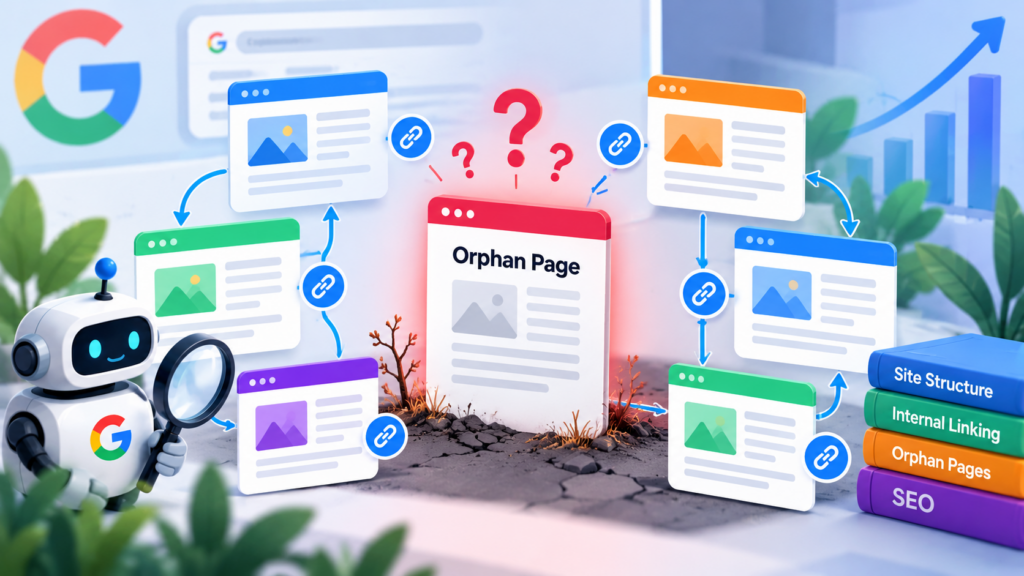
A page can be technically live, included in a sitemap, and still be difficult for users and search engines to understand because nothing on the site links to it. This is the core problem behind orphan pages in SEO.
An orphan page is a page that has no meaningful incoming internal links from other pages on the same website. That does not necessarily mean Google can never discover it—Google can also discover URLs from sitemaps and other sources—but the page is missing an important part of the site’s navigational and contextual structure.
For sites that publish regularly, orphan pages can accumulate after migrations, redesigns, category changes, content pruning, or simply because a new article was published without adding it to a relevant hub or supporting article. Over time, that creates gaps in both user navigation and search-engine discovery.
What Is an Orphan Page?
In practical SEO terms, an orphan page is an indexable URL that has no incoming internal links from other relevant pages on the same site.
Consider a simple content architecture:
- Homepage links to a pillar page.
- Pillar page links to several cluster articles.
- Cluster articles link to related supporting articles and useful service pages.
Now imagine publishing another article and never linking to it from the pillar, category, related articles, navigation, or another useful page. The article exists, but it is disconnected from the site’s internal link graph. That is an orphan-page condition.
Google recommends making pages reachable through crawlable links. Its documentation specifically notes that internal links help Google find pages and understand what those pages are about, and recommends that important pages have a link from another findable page on the site.
Why Orphan Pages Matter for SEO
The biggest mistake is treating orphan-page problems as only an indexing issue. The deeper problem is architectural: an important page has no clear relationship to the rest of the site.
1. Discovery becomes less reliable
Google can discover URLs from several sources, including links and sitemaps. A sitemap is useful, but it is not a replacement for a strong internal linking system. Google describes sitemaps as a way to help search engines discover URLs; they do not guarantee crawling or indexing.
If an important article has no internal path from the rest of the website, you are relying more heavily on secondary discovery mechanisms instead of making the site’s structure explicit.
2. Context becomes weaker
An internal link is more than a navigation mechanism. The surrounding sentence and anchor text can help users and Google understand the relationship between the source page and the destination page.
For example, a contextual link using the anchor technical SEO audit checklist communicates much more than a generic read more link. Google recommends descriptive, relevant anchor text rather than generic or keyword-stuffed anchors.
3. Important content can become isolated
A strong article should have a clear role in your content architecture. It might support a pillar page, answer a specific subtopic, demonstrate expertise, or lead users toward a relevant service.
When no other page points to it, that relationship is harder to communicate. This is particularly important for sites using topic clusters, where supporting articles should reinforce broader topical coverage.
4. Users may never reach the content
SEO is not only about crawlers. If a useful article cannot be reached naturally from related content, visitors are less likely to discover it. A page that performs well in search can still be poorly integrated into the rest of the website.
What Causes Orphan Pages?
Orphan pages usually come from normal website operations rather than one dramatic technical failure.
| Cause | What happens | Typical fix |
|---|---|---|
| New content | A post is published but never referenced elsewhere. | Add contextual links from relevant existing content. |
| Site migration | Old relationships disappear when URLs or templates change. | Map important URLs and rebuild internal paths. |
| Category changes | Removing a category can remove one of the few discovery paths to posts. | Use contextual links and sensible taxonomy. |
| Content pruning | Deleting or redirecting linking pages leaves surviving pages isolated. | Review affected inbound links before removing content. |
| Template changes | Related-post, breadcrumb, or navigation modules disappear. | Verify the new template still exposes important content. |
| Landing pages | Campaign or service pages are created outside the normal navigation. | Give valuable permanent pages a deliberate internal-link path. |
How to Find Orphan Pages
A reliable orphan-page audit compares your complete URL inventory with the URLs discovered through internal crawling.
Step 1: Build the URL inventory
Start with the URLs you believe exist and matter. Depending on the site, this can include:
- XML sitemap URLs
- Published WordPress posts and pages
- Important category and hub pages
- Service and commercial landing pages
- URLs found in Google Search Console
- Important URLs from analytics or historical exports
Do not automatically treat every URL as equally valuable. The goal is to identify important indexable content that should have a place in the site’s architecture.
Step 2: Crawl internal links
Use a crawler to collect incoming internal links for each URL. A page with zero incoming internal links deserves investigation.
Be careful with the definition. A page can be reachable through navigation, breadcrumbs, a related-content component, or body copy. Conversely, a page that has a link only from an irrelevant utility location may still need better contextual connections.
Step 3: Compare the two datasets
The basic logic is:
Potential orphan pages = Important indexable URLs − URLs with meaningful internal inbound links
This is a starting point, not an automatic verdict. Review the resulting list manually because some URLs are intentionally isolated, such as utility pages, account pages, or pages that are not intended to be indexed.
Step 4: Validate indexability and purpose
Before fixing a suspected orphan, ask whether the page should exist in search at all.
If a URL is obsolete, duplicate, thin, private, or intentionally excluded from search, adding internal links may solve the wrong problem. SEO maintenance should first determine the correct role of the URL.
How to Fix an Orphan Page
The best fix is usually not “add a link from anywhere.” The objective is to place the page in the most logical part of the site’s information architecture.
1. Link from the most relevant pillar or hub
If the orphan article supports an existing pillar, add a contextual link from that pillar page. This gives the article a clear topical relationship.
For example, a detailed article about crawlability can naturally sit beneath a Technical SEO pillar and connect to related articles about indexing, internal linking, site architecture, or audits.
2. Add contextual links from related articles
Look for existing pages that already discuss the problem, concept, or use case covered by the orphan. Add links where the destination genuinely helps the reader.
Do not insert links simply to increase a link count. Google explicitly says there is no magical ideal number of links for a page and recommends linking to useful resources in context.
3. Improve hub-to-cluster relationships
For content-heavy sites, a useful pattern is:
- Pillar → major topic overview
- Cluster → focused subtopic
- Supporting article → specific question or implementation detail
The important part is not the exact hierarchy. It is that the relationships are understandable and useful to the reader.
4. Use descriptive anchor text
Choose anchor text that tells the reader what they will find after clicking. Keep it natural and concise.
Good internal anchors describe the destination. Avoid repeatedly forcing the exact same keyword into every link. Internal linking should help people first and clarify the relationship between pages.
5. Review navigation and breadcrumbs
Some pages should be reachable through site navigation, breadcrumbs, or category structures. These are particularly useful for broad content hierarchies.
However, navigation should not become a dumping ground for every URL. Keep global navigation focused on the site’s most important destinations and use contextual links for deeper content.
What About Sitemaps?
Sitemaps and internal links solve different parts of the discovery problem.
Google says a sitemap can help search engines discover URLs and can be especially useful for larger or more complex sites. At the same time, Google recommends making important pages reachable through crawlable internal links.
That means a sitemap should not be used as an excuse to leave important pages disconnected.
A useful way to think about it is:
| Signal | Primary role |
|---|---|
| Internal links | Discovery, context, navigation, and site relationships |
| Sitemap | URL discovery and communicating preferred URLs |
| Breadcrumbs | Hierarchy and user navigation |
| Navigation | Access to major site sections |
These mechanisms complement one another. A strong site architecture does not depend on only one of them.
How to Prevent Orphan Pages
Create a publishing checklist
Every new article should have an internal-link plan before it is published. Identify at least one relevant hub or existing article that should naturally link to the new content.
Update the hub when publishing cluster content
If you maintain pillar or hub pages, treat them as living resources. When a new supporting article is published, review the relevant hub and add the new resource where it improves the reader journey.
Audit after migrations and redesigns
Internal linking often breaks silently during migrations. Templates change, categories are reorganized, old URLs disappear, and content relationships can be lost even when individual pages still return a successful HTTP response.
Run an internal-link audit after major structural changes rather than waiting for search visibility to decline.
Monitor newly published content
A simple editorial QA check can catch many orphan pages: publish the article, then verify that it is linked from an appropriate existing page and that the new article itself links to relevant supporting resources.
Orphan Pages vs. Thin or Low-Quality Pages
These problems should not be confused.
- Orphan page: the page lacks meaningful incoming internal links.
- Thin page: the page provides little useful information for its purpose.
- Duplicate page: substantially similar content is accessible through multiple URLs.
- Unindexed page: Google has not included the URL in its index for a particular reason.
A page can be well-written but orphaned. It can also be heavily linked but still low quality. The correct fix depends on the actual problem.
A Practical Orphan-Page Audit Checklist
- Export or collect the site’s important indexable URLs.
- Crawl the website and collect internal inbound links.
- Identify URLs with no meaningful incoming internal links.
- Exclude pages that are intentionally non-indexable or private.
- Check whether the remaining pages satisfy a real user/search need.
- Map each valuable orphan to the most relevant pillar, hub, category, or supporting article.
- Add contextual internal links with descriptive anchors.
- Review breadcrumbs and navigation where appropriate.
- Verify the page is included correctly in the XML sitemap when it should be indexed.
- Re-crawl the site and confirm the orphan condition is resolved.
- Repeat the audit after major migrations, redesigns, or content restructuring.
Final Takeaway
Orphan pages are fundamentally a site-architecture problem. The solution is not to manufacture links or add every URL to a menu. The goal is to make valuable content discoverable, understandable, and connected to the pages around it.
For a healthy SEO architecture, think beyond individual pages. Build clear relationships between pillars, clusters, supporting articles, service pages, and other important destinations. Use crawlable internal links to establish those relationships, and use your sitemap as a complementary discovery mechanism.
For more guidance on building a stronger internal structure, see LogixScale’s Internal Linking Strategy, Technical SEO Audit Checklist, and 7-Pillar SEO Architecture.
Sources: Google Search Central: Link Best Practices; Google Search Central: Sitemaps; Google Search Central: Build and Submit a Sitemap.