
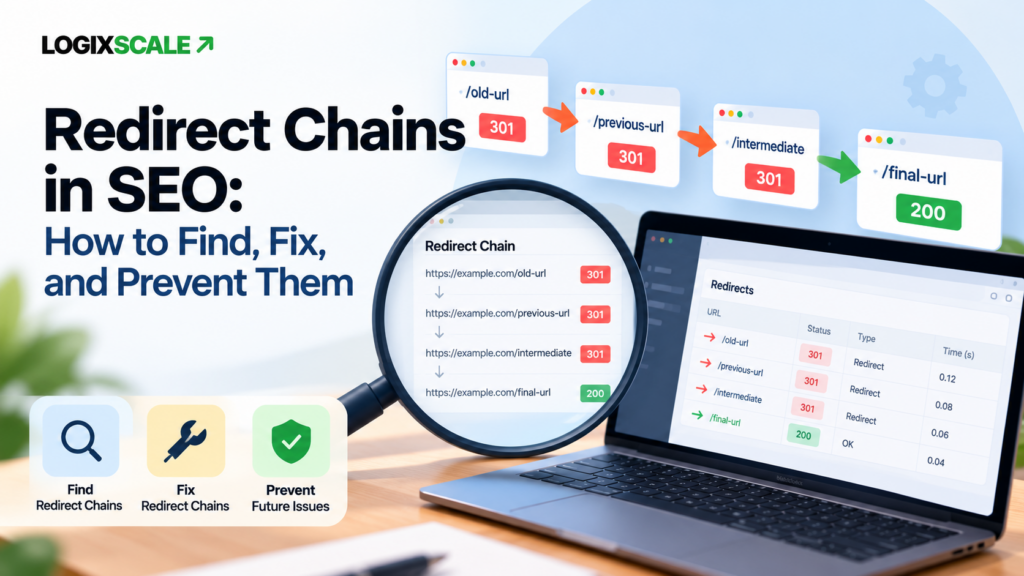
Redirects are essential when URLs move, but a redirect setup can become inefficient when one old URL points to another redirected URL before reaching the final destination. That pattern is a redirect chain.
For SEO, the practical goal is simple: when an old URL genuinely needs to redirect, send users and crawlers as directly as possible to the final, relevant URL. Google currently recommends server-side permanent redirects such as 301 or 308 when appropriate and recommends avoiding redirect chains.
This guide explains what redirect chains are, why they matter, how to find them, how to fix them safely, and how to prevent them during migrations, redesigns, and ongoing URL changes.
What Is a Redirect Chain?
A redirect chain happens when the requested URL passes through one or more intermediate redirect URLs before reaching its final destination.
/old-page/ → /new-page/ → /final-page/In this example, the better implementation is usually:
/old-page/ → /final-page/The extra hop may have been created because the site changed URLs more than once over time. For example, a page can move from an old slug to a campaign slug and later to a permanent content slug. Each change can leave another redirect layer behind.
Redirect vs. Redirect Chain
A single redirect is not automatically a problem. Redirects are a normal part of web maintenance, migrations, URL consolidation, and content restructuring.
| Pattern | Meaning | Typical action |
|---|---|---|
| Old URL → final URL | Direct redirect | Usually preferred when a redirect is necessary |
| Old URL → intermediate → final URL | Redirect chain | Review and simplify |
| Old URL → final URL → another redirect | Redirected destination | Update the source to the true final URL |
| Old URL → unrelated page | Poor relevance | Check whether the redirect should exist at all |
The key distinction is not “redirects are bad.” The issue is whether the redirect path is necessary, efficient, and semantically appropriate.
Why Redirect Chains Matter for SEO
1. They add unnecessary latency
Each additional redirect can add another network request before the final page is reached. That can increase waiting time for users, particularly on slower connections or across multiple infrastructure layers.
Google’s current site-migration guidance explicitly notes that redirect chains can increase user waiting time and recommends sending redirects directly to the final destination where possible.
2. They make crawling less efficient
Search engines can follow redirect chains, but there is little benefit in making crawlers traverse unnecessary hops. A clean redirect map makes the site’s URL relationships easier to maintain and reduces technical complexity.
This is especially relevant during migrations, when hundreds or thousands of legacy URLs may still be discovered from old links, external references, sitemaps, or historical signals.
3. They increase maintenance risk
A chain can break when an intermediate URL changes again. Consider:
/a/ → /b/ → /c/If /b/ later disappears or changes to /d/, the original redirect may now produce an avoidable chain or an error. The more intermediate URLs you keep, the more dependencies you have to maintain.
4. They often reveal historical URL debt
A redirect chain can be evidence that the URL structure has changed multiple times without the old redirects being consolidated. Finding chains therefore gives you an opportunity to clean up accumulated technical debt.
How Many Redirect Hops Should You Have?
Google’s current guidance says Googlebot can follow multiple redirects in a chain, but it recommends avoiding chains and redirecting directly to the final URL. When a chain cannot be eliminated immediately, Google recommends keeping the number of redirects as low as possible, ideally around three or fewer and below five where possible.
For practical SEO engineering, the best target is therefore not “keep chains under a magic number.” It is remove unnecessary intermediate hops.
What Causes Redirect Chains?
URL changes during a migration
A migration may create an initial redirect map, then a second wave of URL cleanup creates another map. If the original URLs are not updated, the older URLs can continue pointing to intermediate destinations.
Repeated slug changes
Changing a post or page slug several times can create a sequence such as:
/guide/ → /seo-guide/ → /technical-seo-guide/Updating the first redirect to point directly to the current URL removes the extra dependency.
HTTP to HTTPS plus other redirects
Domain, protocol, hostname, and path changes can sometimes stack together:
http://example.com/old → https://example.com/old → https://www.example.com/old → https://www.example.com/newThe exact architecture varies by server and proxy, but the objective remains the same: consolidate the routing rules so the original URL reaches the final canonical destination efficiently.
CMS or plugin rules
WordPress redirect plugins, server rules, CDN redirects, and application-level routing can all participate in the same request path. A chain may not be visible if you inspect only one layer.
Migration redirects pointing to outdated URLs
This is one of the most common maintenance problems. A redirect map created years ago can still reference a URL that has since moved again.
How to Find Redirect Chains
1. Start with a crawler
Use a technical SEO crawler that can inspect redirect responses and final destinations. Export URLs that return 3xx responses and inspect the full redirect path.
Do not look only for the first 301 or 308. The important question is whether the redirecting URL eventually reaches the final page through additional redirects.
2. Test representative URLs directly
For important legacy URLs, verify the complete response path from the server. Check:
- Initial status code
- Location header
- Next response
- Final status code
- Final URL
A useful manual check looks like:
URL A
 ↓ 301
URL B
 ↓ 301
URL C
 ↓ 200
The cleanup target is usually:
URL A
 ↓ 301
URL C
 ↓ 200
3. Review server and proxy layers
A redirect can be generated by more than WordPress. Check the layer that owns the response: CDN, reverse proxy, web server, application, or redirect plugin.
This matters because changing only the WordPress rule may not remove a server-level redirect that still runs first.
4. Compare redirects with your canonical URLs
A redirect should generally resolve to the URL you actually intend users and search engines to use. If a legacy URL redirects to another URL that itself has a different canonical destination, investigate the mismatch.
Google’s documentation notes that incorrect redirects or canonical signals can contribute to unexpected canonical selection.
How to Fix a Redirect Chain Safely
Step 1: Identify the true final URL
Before changing the redirect, establish which URL is the intended destination. Verify that it is live, relevant, indexable when appropriate, and not itself redirected.
Step 2: Update the source redirect
Change the original redirect so it points directly to the final destination.
Before:
A → B → C

After:
A → C
Step 3: Preserve the redirect when it still has a purpose
Do not remove a legacy redirect simply because you found a chain. If the old URL is still a valid historical entry point, keep the redirect but simplify its target.
Step 4: Update internal links
If your own site still links to a redirecting URL, replace that internal link with the final destination whenever practical. This helps visitors avoid unnecessary hops and keeps your architecture aligned with the current URL set.
Step 5: Re-test the full path
After making the change, re-fetch the original legacy URL and confirm the new path reaches the final page directly.
Redirect Chains During Website Migration
Migrations are where redirect-chain problems can multiply quickly.
A robust migration process should include:
- Create an old-URL to new-URL mapping.
- Define the final destination for each legacy URL.
- Implement server-side permanent redirects where appropriate.
- Test representative old URLs.
- Crawl the migrated site for remaining redirect chains.
- Update internal links to point directly to the new URLs.
- Re-check important legacy URLs after launch.
Google recommends using permanent server-side redirects such as 301 or 308 for site moves when technically possible, and recommends avoiding redirect chains during migrations.
For broader migration planning, see LogixScale’s Website Migration SEO guide.
Redirect Chains vs. Redirect Loops
These are different problems.
A redirect chain eventually reaches a destination:
A → B → C → 200A redirect loop never reaches a final page:
A → B → A → B → ...Loops are generally more severe because the requested page cannot resolve normally. They should be treated as an immediate technical issue.
What Not to Do
- Do not redirect every old URL to the homepage. Use a relevant final destination.
- Do not delete redirects blindly. An old URL may still be referenced externally.
- Do not fix only the first hop. Inspect the complete response chain.
- Do not assume WordPress owns every redirect. Check server and proxy layers too.
- Do not use robots.txt to solve redirect problems. Redirect routing and crawl controls are different technical mechanisms.
Practical Redirect Chain Audit Checklist
- Export URLs returning 3xx responses.
- Identify URLs with more than one redirect hop.
- Find redirect destinations that themselves redirect.
- Check whether the final URL returns a successful response.
- Confirm the final destination is relevant.
- Confirm the final URL matches your intended canonical architecture.
- Update source redirects to point directly to the final URL.
- Replace internal links that still target redirected URLs.
- Check migration and legacy redirect rules at every infrastructure layer.
- Re-crawl and confirm the chains are removed.
- Re-check important legacy URLs after future migrations or slug changes.
How Redirect Cleanup Fits Into Technical SEO
Redirect cleanup should be treated as part of broader technical SEO rather than as an isolated housekeeping task.
A practical workflow is:
Crawl the site → collect redirecting URLs → inspect full chains → identify the final canonical destination → simplify redirects → update internal links → re-crawl → verify.
This approach keeps URL routing, crawlability, internal linking, and canonical signals aligned.
Final Takeaway
Redirects are an important part of a healthy website, especially when URLs change. The problem is unnecessary routing complexity.
A strong implementation keeps useful legacy redirects in place while sending them directly to the final, relevant URL. That reduces latency, simplifies maintenance, improves URL architecture, and follows Google’s current recommendation to avoid redirect chains where possible.
For ongoing technical SEO, treat redirect auditing as a recurring part of migrations, redesigns, slug changes, and URL cleanup—not as a one-time task.
Continue with LogixScale’s Technical SEO Audit Checklist, SEO Log File Analysis, and Internal Linking Strategy for related implementation guidance.